Product tour
ICS Select has two distinct experiences. The admin (the educational director) uses a classic sidebar shell with dense data surfaces. The member uses a Magazine Editorial layout designed to feel less like a productivity tool and more like opening a publication that knows where you are in your study.
This page walks both.
The member experience
Today, on the home
Every cycle morning, a member opens /me. The home is the daily entry point: a hero block that says either “you have items waiting” or “you finished, well done”, a short list of what is up next, the current streak, and the cohort feed below.
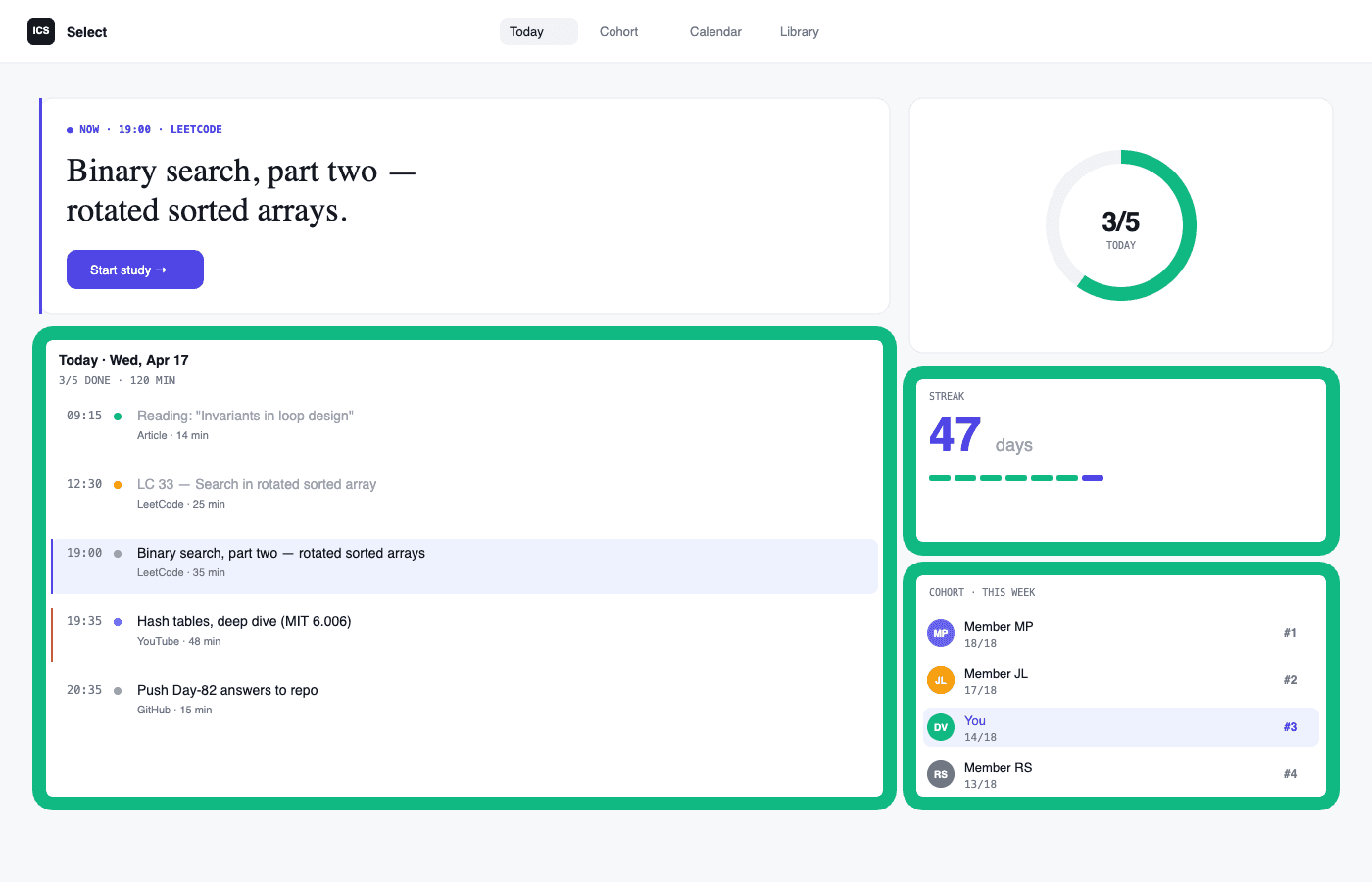
The hero state is earned, not decorative. When the member has work to do right now, the hero gets the indigo --focus accent. When something is past its scheduled time, the accent shifts to terracotta --accent for “running late”. When there is nothing left, the dot goes green and the message becomes a quiet “you are done for today”. There is exactly one accent per visual unit, never decoration for its own sake.
Marking an item
Items do not have a binary done/not-done. They have six discrete outcomes:
| Outcome | When the member picks it |
|---|---|
| Nailed it | Finished and would explain it to someone else. |
| Got it, hard | Finished, but it took real effort. Surface for a follow-up. |
| Had doubts | Finished the work itself, but still wants to revisit. Adds a note to the timeline. |
| Stuck | Could not finish without help. Sends a STUCK signal to the admin’s WhatsApp. |
| Skipped, already knew it | Member opted out because the material was already mastered. Counts as done. |
| Not yet | The default. Nothing has been marked. |
Four of these (nailed it, got it hard, had doubts, skipped) count as positive outcomes: the work is closed. Only not yet and stuck carry forward into the next week’s draft plan. This distinction is the single source of truth across the system: cohort progress, engagement scores, topic coverage, and the AI’s plan-drafting logic all read from isPositiveOutcome, never from a hand-listed if/else.
Streak and cohort
The streak counts distinct BRT days where the member marked at least one item positive. Local-date discipline matters here: the database stores timestamps in UTC, but the score and the streak operate in São Paulo time. Without the conversion, an item marked at 22:00 BRT bleeds into the next UTC day and collapses two real study days into one.
The cohort surface (/me/cohort) shows the ranked list of the cohort by engagement score, gated behind an admin toggle. When the toggle is off, the member just sees the alphabetical roster without numbers, no peer pressure. When it is on, the member sees the headline 0 to 100 score but not the per-criterion breakdown, that detail is admin-only.
The admin experience
Cycle cockpit
The admin’s primary surface is /admin/cycle/[id]. It is the single page they live in during a cycle: ranking, triage, cohort heatmap, classes, and a live activity feed.
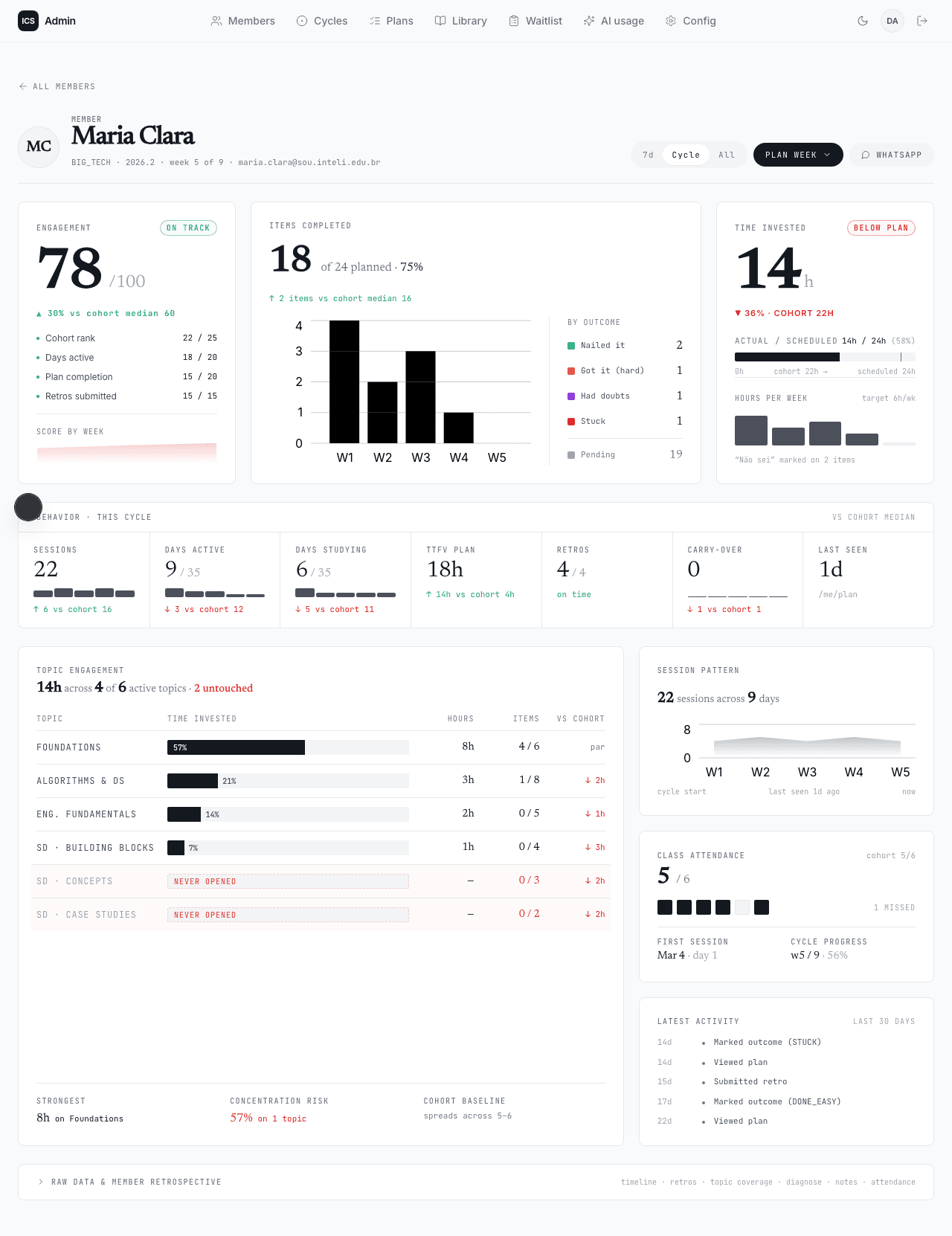
The engagement score is the same 0 to 100 number the member sees, but the admin sees the breakdown. Six criteria sum to 100:
| Criterion | Points | What it measures |
|---|---|---|
| Cohort rank | 20 | Position by items completed, the only comparative criterion. |
| Days active | 15 | Distinct BRT days with at least one positive outcome. Ceiling at 50% of the cycle. |
| Plan completion | 27 | The flattering one: personal completion rate or items-done vs. cohort median, whichever is higher. |
| Retros submitted | 21 | Weekly retros, divided by weeksElapsed - 1 so the current open week is not counted as missed. |
| Class attendance | 5 | Present-marked attendances over classes already held. |
| Recency | 12 | Tiered: today, last 3 days, last week, or longer. |
The criteria are calibrated to make engagement legible without being punishing. The “plan completion” criterion takes the better of two ratios (personal vs. cohort median) so a member with a smaller plan does not get penalized for that. The “retros” criterion does not start charging until the second week, because the first week’s retro window is still open during week one.
Cockpit states
The cockpit is the same component in every state, but the visual treatment shifts based on the status the score implies.
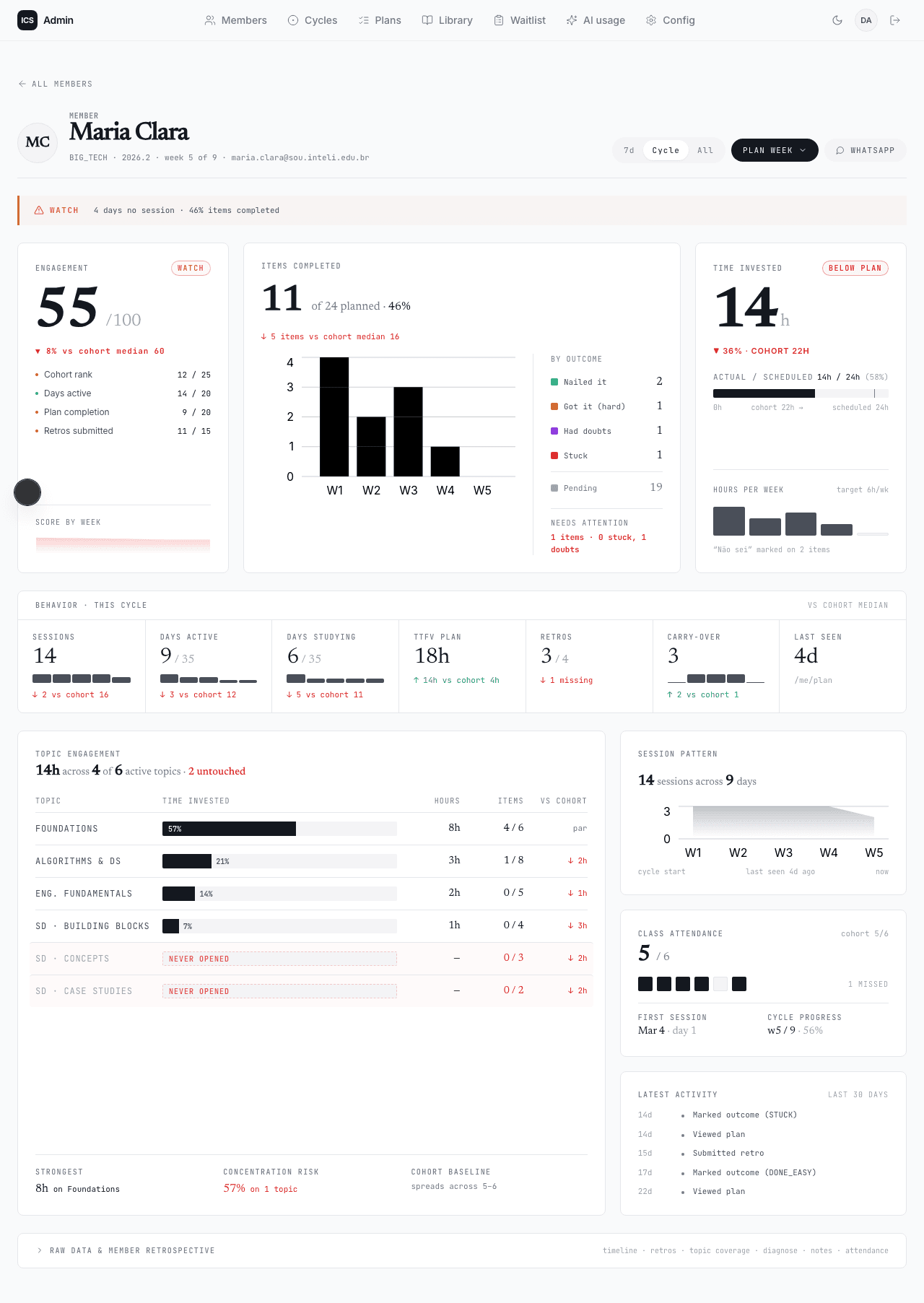
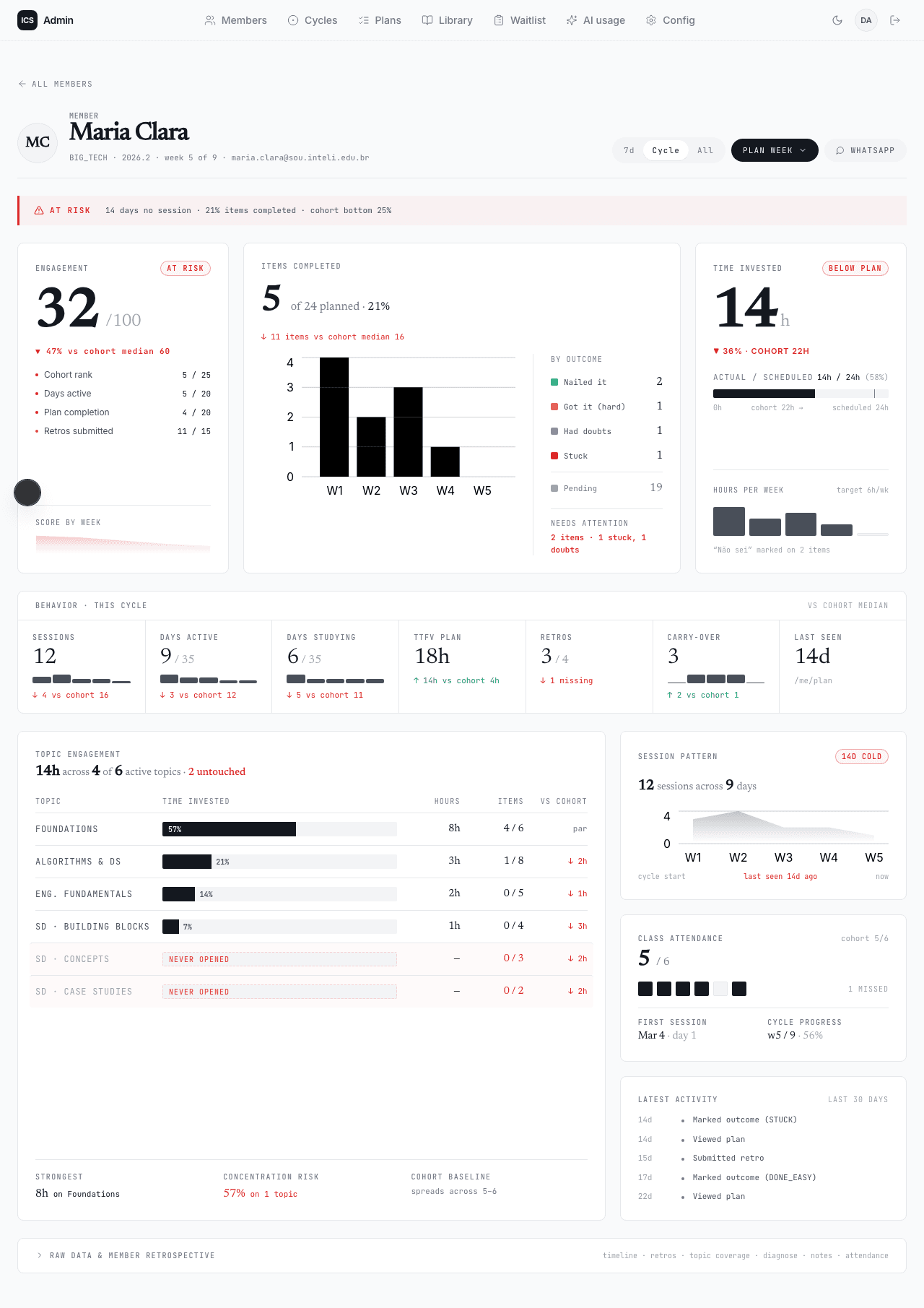
The director uses these as the daily triage signal. The cohort page lists everyone with a hasAlert flag when a member marked STUCK in the last 72 hours, the cockpit is where the director goes to read the timeline and decide what to do next.
Plan editor
The plan editor is the admin’s authoring surface. The left panel lists the member’s carry-over candidates (anything marked not yet or stuck in the previous week). The right panel is the draft for the upcoming week, with items grouped by topic and a daily-minutes estimate at the top.
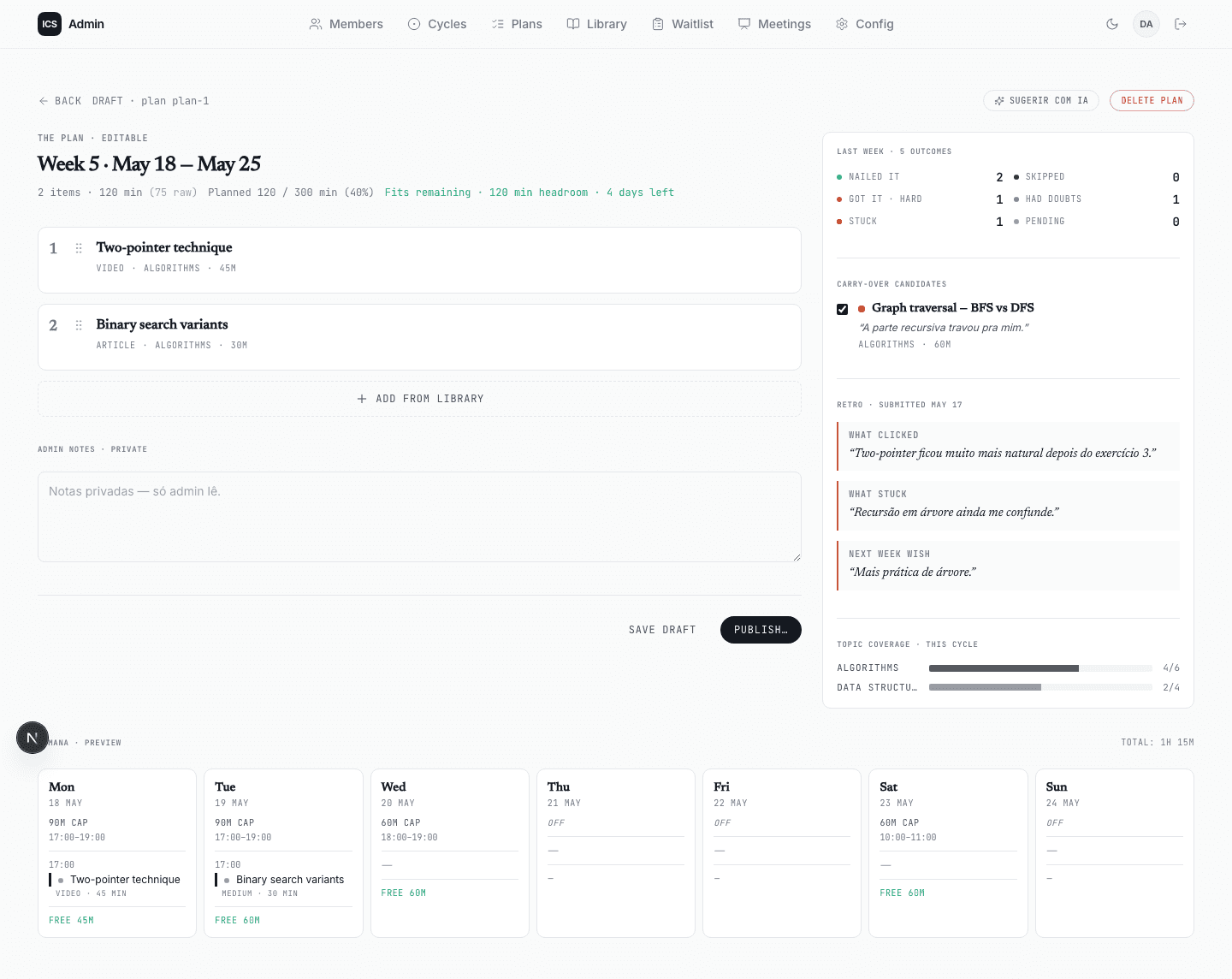
The admin authors items by either picking from the library (which respects the EASY → MEDIUM → HARD ladder per topic and hides items the member has already mastered) or writing a custom item. The item’s order is a hard constraint at scheduling time: the scheduler will under-fill a day rather than reorder, because the director’s pedagogical sequence is the whole point.
Once published, the plan is locked, sessions are created on the member’s Google Calendar with an ICS ID: <planId>/<itemId> marker in the event description (so cleanup and notifications can find them), and the member sees the week light up on their home.
Surfaces not pictured
A few more surfaces exist but are not screenshotted here yet:
/admin/libraryand the in-editor library picker, where the curated acervo lives./admin/ai-usage, the OpenAI cost dashboard./me/retro, the weekly retrospective form./me/calendar, the read-only week view of scheduled sessions.
The Design system page explains the visual vocabulary that ties all these surfaces together.